 Namecheap offers a free DNS hosting solution for your websites. You can use it together with your domain name to create any email address @yourdomain.com that is forwarded to another email account of your choosing.
Follow the steps given below to setup your email forwarding:
- First you’ll need a domain name. I recommend Namecheap for domain registration.
- Log in to your namecheap account and head over to their freeDNS page
- Follow the prompts to add your domain name to their FreeDNS service. Be sure to change the DNS settings for your domain name.
- Then from the top navigation menu choose My account > manage domain names. From the left side menu choose “hosted domains” under the FreeDNS menu.
- Select your domain name from the list and choose “free email forwarding” and save the changes using the button at the bottom of the page.
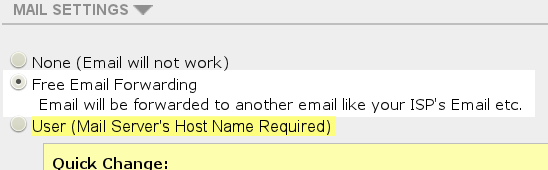
Free email forwarding
- Then use the “Email forwarding option” under the email management menu on the left hand side to setup your email addresses.

Using this free service you can enjoy email forwarding using your own custom domain name. If you like you can also try gmail-like free email hosting with google apps.
I tried to set up forwarding this way but could not get it to work. I ended up using deluge.cc
free dns current have issues with email forwarding namecheap has not yet fixed the issue it been nearly a month
Has it got to do with forwarding to a gmail account? Google imposes some pretty tough limits on forwarding to gmail so forwarders like namecheap have to be careful or their IPs will be banned by Google.
I have 25 domains with Netcheap. The Netcheap email forwarding with the FreeDNS service is simply not working. It is not just for google addresses either. Customer service is not being honest and they are instructed to pretend they believe it is working and will walk you through the paces of setting it up then tell you to wait a while for it to take effect. Then when it doesn’t work and you contact them back they act as though each customer is experiencing an unexpected failure and they issue a trouble ticket, then nothing happens. They tell you that they are monitoring the situation and will let you know just as soon as they know anything. This has been for more than a month. The reason I need to use the freeDNS service is that their regular DNS does not support email to sub-domain addresses such as name@something.domain.com — Other than this their service has been okay I guess but they have not been trustworthy about this issue and they are not being respectful to customers when they pretend it is a new issue for each customer. They will not give any estimate of a date when this will be resolved either.
Do you mean namecheap or netcheap? You should get free email hosting for your domains using one of the email hosts listed here:
https://abdussamad.com/archives/139-Free-email-account-at-your-domain-name-with-google-apps.html
I think email forwarding is not something you can rely on. The major email providers limit the number of emails you can forward to their users so that is why any forwarding solution is going to be troublesome. I didn’t know that back when I wrote this article.
You are correct, I meant “namecheap” that has the problem. As for your suggestions, MANY THANKS! I’ll check them out to see if they provide free email forwarding that will work for my application. Namecheap claims that their freeDNS (not the basic DNS setup that comes with the domains registered with them) can forward subdomain email addresses such as name@something.domain.com, but as mentioned, their freeDNS system has been broken for some time now as far as the email forwarding. I won’t need a high volume and it works fine with the regular forwarding if I don’t use the subdomains. Most providers do not support forwarding subdomain email. If I find anything of interest, I’ll post. Thanks again!
I meant the namecheap basic DNS has working email forwarding (but not for subdomains). The freeDNS email forwarding does not work, subdomains or not.
Update: Zoho got back to me today that their free service unfortunately does not support subdomains. Yandex and Inbox.eu have not yet replied as to whether they can do this, so we’ll see what they say. As mentioned, Namecheap’s freeDNS (but not their basic DNS that you get with domains registered to them) is supposed to allow forwarding from subdomain addresses, but the email forwarding for the freeDNS service has been broken for quite some time now. The regular Netcheap email forwarding for my domains I have registered with Netcheap does work, but not for subdomains. earlearl
Thanks, and if you have any alternate suggestions please pass them along 🙂
Google Apps will work with sub-domains. Alternatively you could just buy a new domain name? If $10/year for a dotcom is too much then you can look at some of the newer gTLDs.
Thanks. I got it working with your suggestion of inbox.eu
It was a particular vanity domain with one of the new extensions that I own that I wanted to use with a subdomain. Something like
Susan@my.flower.garden
for example.
Anyway, your suggestion of inbox.eu did provide me a solution so many thanks for that!!!
I initially had a snag with validating my domain with inbox.eu. I was using the MX record method. I was told to add the inbox.eu MX record on the website of my domain provider (registrar). This was not correct in my case, since I am using Namecheap name servers rather than the registrar’s nameservers. So I added the inbox.eu MX records at the registrar’s website but it wouldn’t work. I had to instead add the inbox.eu MX records on the Namecheap website. It took a while but I finally got it figured out. This would have probably been quite obvious to you, but I’m not quite so knowledgeable 🙂 Thank you so much!