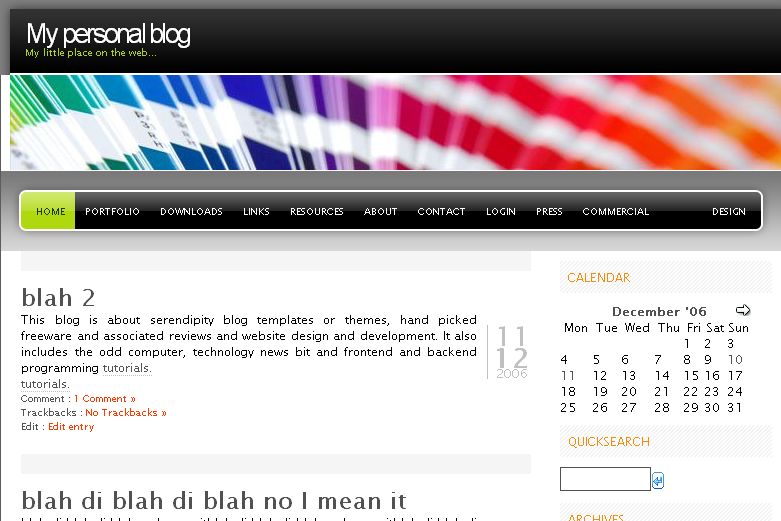
In preparation for the next Google dance I have gone and ported Julien De Luca’s freshy wordpress theme to serendipity. Freshy is one of the most popular themes for wordpress and it includes a whole host of options for users wanting to customize it. I decided to port it after a user requested it on the s9y forums. But I later realised that it wasn’t as easy to port as I first thought. All those admin options make the theme really complicated and I haven’t included some options so it is really a partial port. The following options are available to users of s9y 1.1 who use the ported theme:
- Change header image. You can choose from a number of images included with the theme.
- Customize the links in the navigation bar
- Change the highlight colour of the navigation bar
- UPDATE: 30 Jan 2007 – You can now customize the label of the link in the top navigation bar that points to your blog front page i.e. the “home” link. This option allows you to specify a label in your own language to fit in with the rest of your blog.
- UPDATE: 11 May 2007 – You can now also use a custom header image using the serendipity media manager. This feature was back ported from the beautiful day theme.
- UPDATE: 1 April 2008 – Freshy now supports two sidebars. If you have plugins in both the left and the right sidebar freshy will expand to accommodate them.
- UPDATE: 15 April 2008 – Fixed a bug that caused certain plugins to not display correctly with freshy in 2 sidebar mode.
- UPDATE: 18 April 2008 – Improved security of the header image selection code.
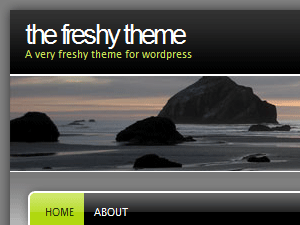 I omitted the option to customize the colours of text, links etc. and the option to choose between predefined styles that are included with the original theme. I did however compress the header images so they take less time to load. You can download freshy here.
Technical details and customization info for pre 1.1 s9y users follows.
Freshy customization by pre s9y 1.1 users
Most customization can be done simply by editing the index.tpl file. I have placed appropriate comments at the lines where you can enter your customizations. You can change the header image by adding css code at line 52:
<style type="text/css"> #title_image {ldelim} background-image:url( "{serendipity_getFile file=images/headers/filename.jpg}" ) !important; {rdelim} </style> |
Replace filename.jpg with your choice of header image.To change the links in the nav bar you must add appropriate code at lines 81. A sample link is included in index.tpl. Remember to retain the links with classes "first_menu" and "last_menu". You may customize them but don’t delete them since that will break the layout.
Highlighting the current page link
One of the requirements of porting this theme was the need to highlight or differentiate the nav bar link pointing to the current page that the user is viewing. This is important because it helps the user know which page he is viewing when he is navigating a site. With help from Garvin at the s9y forums the problem was solved in this fashion. First the current page is exported as a smarty variable in config.inc.php:
$serendipity['smarty']->assign( array( 'currpage'=>"http://".$_SERVER['HTTP_HOST'].$_SERVER['REQUEST_URI'] ) ); |
Then it is compared to the navigation links as set by the blogger:
<li class="{if $currpage==$navlink.href}current_{/if}page_item"> <a href="{$navlink.href}" title="{$navlink.title}">{$navlink.title}</a> </li> |
Hi, Abdussamad!
I’ve seen your port of the freshy theme and allI can say is great work!!! I’ve testet it on my Testingarea http://www.taeglichanders.de/blog and there’s only one “problem. The Navigation on top does not Highlight when changeing the site. Is this aknown thing or is it maybe only a problem to me?
Thanks for any help,
Chris!
Hi
First of all I am glad you liked it. I looked at your site and I see that you have specified the relative path when configuring your nav bar. For ex: index.php?/pages/gallery.html instead of http://www.taeglichanders.de/blog/index.php?/pages/gallery.html . If you change the link paths to the absolute path (prepend http://www.taeglichanders.de/blog/) then it should highlight the current page link correctly just like it does with your home page link.
HTH
Abdussamad
Oh, yes… of course 🙂 Works fine!
All thumbs up to this great port!
Chris
Hi !
I tried to use the theme, uploaded it to my template folder and have a problem :):
although I use s9y 1.1 I cannot change the new template options f.ex I choose a head-image -> after a click on save the settings are gone. In the standard setting no image is shown. In the DIV where the image should be included is nothing in the source code (
)
Could you please help me ?
Hi Taz
You say that the settings are gone? Do you mean that the settings are not saved? Go back into your admin panel and click on manage styles. If the header image you chose is not the selected option then the theme config data is not being saved. In that case you have something wrong with your s9y installation. Perhaps you should ask about this in the s9y forums.
Hi !
What you describe is exactly my problem. my changes are not saved. I will ask in the s9y-forums :).
I have updated two of my serendipity blog system templates. The following updates were made:Freshy: The ever popular freshy theme now has the additional option of custom header image selection via the serendipity media manager a la beautiful day.Rounded
This article takes you through how to implement header image selection via the media manager in your serendipity templates configuration.I first introduced this feature in the beautiful day theme and it proved to be quite popular.
There are two parts to
Und somit habe ich auf Anregung von Pulsiv das Kubrick-Theme mit Microsoft Paint verändert. Andere Software kam lediglich zum Konvertieren zum Einsatz, weil man bei Paint die Jpeg-Komprimierung nicht einstellen kann (zumindest ist mir kein Weg dazu bekann
Hi !
I’ve got a problem with your Freshy port: If a line in the blog entry or comments is too long, it’s not automatically wrapped or goes about its borders (writting in other sections on the right). It’s just cut off, which is not really good.
What do I have to change in the code ?
You could try and change the code for #content in styles.css . Change the line
overflow:hidden;
to
overflow:auto;
or
overflow:scroll;
Hi,
im using your freshy port for quite a while with some custom css settings.
Since a day or so, the layout is destroyed and i cant figure out whats wrong.
When you take a look at sidebar, youll notice that ‘the background stops after the last widget’, i think you know what i mean.
do you have an idea how to fix that?
I cant remember changing anything in the CSS in the last weeks.
So, if you have a little time, please take a look 🙂
Thanks in advance
I can’t figure out what is wrong with your site theme. When I ported the theme I simply adapted the html to the css rather than the other way around. You, on the other hand, have heavily modified the theme and so I think you probably have a better idea of the freshy css than me. I suggest taking the question to a general css forum where the css experts are.
I see, well, wheres my CSS book 🙂
Thank you anyway for porting this theme.
First of all thanks for this great port. I fell in love on first sight 🙂 Solving same problem as Chris had worked great. But still one thing left at my page. I put the Impressum to the last (outer right) position. But now the hover (light grey) is not working. Maybe if you have an idea pleas let me know. Thanks in advance, Thomas
Add this to your freshy style.css file
#sidebar a:hover {
border-bottom:1px dotted #FF3C00;
}
Sorry I misunderstood your question. Please ignore my last comment. It will not fix the problem.
You have discovered a bug in the freshy port. I have updated the download on this site with the bug fix and you should download it.
Actually the only thing that has changed is one line in the index.tpl file but I can’t get s9y to display smarty code in the comments so I just updated the zip file.
Hi, works very fine 🙂
Thanks a lot for your fast as light support!!
Thomas
And how do I add second sidebar on the other side ?
Thanks for the Nice Tips! Greetz from germany
Hello, I love your theme!
I was wondering if you can tell me how to stretch the layout a bit, or maybe to 100%. I can’t seem to find the right width to change, it just mess it up. Thanks in advance.
Its a fixed width layout. Changing the size means you will also have to resize all the images. Its not an easy job.
i understand, seems like a lot of themes are doing that. thanks anyway.
Can you please upgrade that awesome Style for Serendipity 2.1?
Can’t use it because ther is only a white site 🙁
I no longer use s9y so I can’t update this theme. Maybe you can get some of the active members on the forum to do it for you?