The question of a graphical SFTP client for Linux came up after I switched to using OpenSUSE Linux as my desktop operating system. On Windows you have the excellent WinSCP but what about Linux ? The answer is very strange.
Simply put there is no specialist GUI SFTP client for Linux! Instead the job is done by the file manager of your Desktop Environment. That means Dolphin under KDE and Nautilus under GNOME.
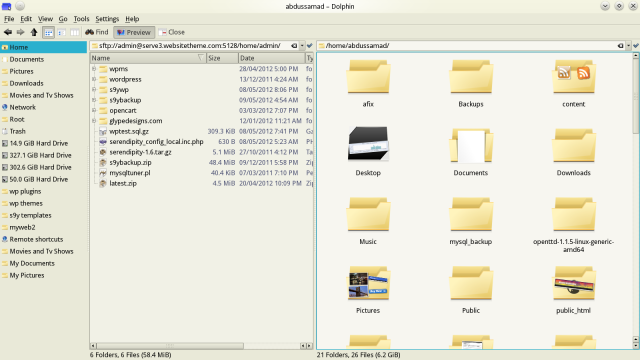
Dolphin split Window with SFTP
Since I am a KDE kind of guy I will write about how to use Dolphin to access your server via SFTP:
- First make sure you can see the location bar by pressing CTRL +L
- Enter the username and address of your SFTP server in this format:
sftp://user@example.com:22
Replace 22 with the correct port number.
- Dolphin will now attempt a connection. If you have setup password-less public key authentication you will be logged in immediately. Otherwise Dolphin will ask for your password.
Now you can manage the files on your server as you would manage local files. You can even split the Dolphin window and drag and drop files to/from the server.
One thing to note is that when deleting files from the remote server Dolphin might complain about the lack of a trash folder. So you have to press Shift+Delete to delete files permanently.
Filezilla is also available as an SFTP client on Linux.
Thanks!, I was looking just for this, and works perfectly 🙂
Perfect answer for a perfect n00b like me. Thanks
I’m getting this error when I try to sftp:// in dolphin (kde 4.10.4)
kex error : did not find one of algos zlib@openssh.com,zlib in list none for compression algo client->server
I don’t know man. It looks like you are missing some libs. Try searching for and installing zlib related libraries. Also I see you’ve posted about this on arch linux forums? Hope you have better luck there.
Thanks!
Thanks ! Useful tip really, I have a problem with filezilla and wxwidget so this tip come in handy.
I haven’t had to use Dolphine. I tried the same way with Nautilus. But it’s painfully slow.
Use filezilla then. It’s available in most distros repos.
Amazing way to do it. Thank you!
Wow!
What a simple way to connect to ftp/sftp! I am using Ubuntu GNOME, and it is working good!
5+ year old, but worth it!
Filezilla is good but, does not stand to required expectation. You can not easily use public key based authentication, and it is the most common case for developers especially those working with AWS. We need a simple, easy and powerful tool like bitwise ssh client.
an issue that arrises that when 2-step vertification is requested typed in the right 6 digit number, fails.