A simple free program that I often use is ontop. On top makes a window always stay on top of other windows. This is useful if you want to copy things from one window to another or if you want to look at two documents simultaneously.
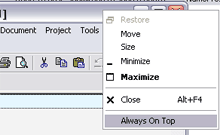
Ontop works very easily. You run it either manually or place a shortcut to it in your start menu startup folder and it will run on windows startup. When running ontop displays a small icon in the system tray. Using it is very simple. Just right click on a window title bar and you’ll see the new option "Always on top". Click on that and your window will never be buried. Click it again to make it function like all other windows.
Author’s site (strangely empty)
Nice little program, does exatly what it says on the tin 🙂
Works on Vista too 🙂 Thank you!
Awesome!
Thanks for your program. It works like a charm.
Thank you! Works on Vista 64 bit.
Nice Cool
i am using “cygwin” to compile some c/c++ programs.
this program doesn’t work with the cygwin window?
any ideas ?
Yeah it doesn’t work with some programs. Maybe you should contact the developer:
scott at planetscott dot ca
I come from the year 2020 with the same problem. 🙁
Thanks for the download link.
Works great in vista and uses 0 resources.
What a g8 application.. Can i know hw we can make programs like these
Thanks, dude!!!
awwwww yea. thanks. this program is sick
Very nice program !
Works great with Vista 64-bit but oddly, not with any windows created by Java. That would be really awesome if you could get that to work.
Thank you for this nice tool 🙂
Thank you very much! It works also for Win7 perfectly.
Thanks a lot
Thanks ^^
now I can watch Star Wars while doing … like ANYTHING!
thanks you very much of you program sir!
ive been searching hours before i find the best one and this is it… more power to you…
Fabulous! Simple, lean & portable!
How does it work?
Are you really at Princeton? Just look at the screenshot above.
– Run the program.
– Right click on a window title bar and select always on top to make it stick.
Or were you asking how it was coded? I am not the programmer. You can email him at scott at planetscott dot ca
Nice!!!
Any chance of getting the program to start as service (i.e. it loads when Windows is started)?
You can add a shortcut to the program in your start menu > startup folder. That way it’ll start up when Windows starts.
dont think it does work with Windows 7 64 bit if it does what im doing wrong?
if i look at the task bar there stands disabled and i cant change it with right click and not even in system control.
Wow, simple but it help me a lot.
compatible with Windows 8.1 (x64)
Neat little App, big thanx @Scott(?)
thats open not 🙁